

Credential Management
The Credential Management page is a centralized area to store login credentials that you or other members of your tenant have set up and that you have privileges to access. Credentials can be tied to engagements, scanners, integrations, or agents.
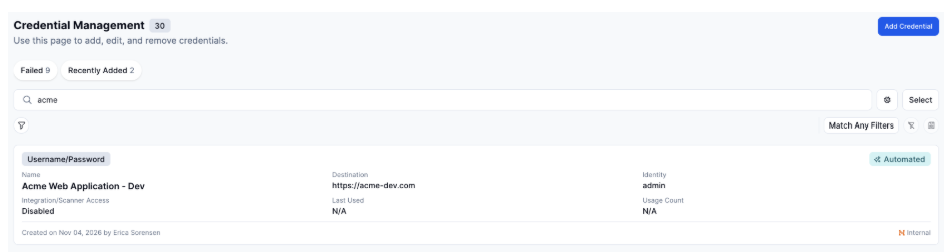
To search credentials, enter search text in the Search field.
Credential card

-
Top-left badge: The credential type. For example, Username/Password.
-
Top-right badge: Whether the credential is automated. AI can automatically verify that the credential works. When enabled, AI clicks through the system and attempts to log in with the information provided.
-
Name: Name given to the credential.
-
Destination: The URL or target the credential is used against.
-
Identity: The user associated with the credential. N/A will display if none is set.
-
Integration / Scanner Access: Displays whether the credential is enabled or disabled for use by integrations and scanners.
-
Last Used: Displays the date the credential was last used. N/A will display if it has never been used.
-
Usage Count: Displays the number of times the credential has been used. N/A will display if it has never been used.
-
Footer: Displays the creation date and the user who created the credential.
Credential details
Overview
Shows the key information about this credential as it was configured during setup.
Activity
Shows a chronological history of everything that has happened with this credential since it was created, including what each action was and who performed it.