

Allowed Login IPs
The Allowed Login IPs page is where you configure the domain and optional IPs that your organization's NetSPI Platform users may use when logging into the platform.
If you have not yet set allowed domains for your organization in the NetSPI Platform, the following displays on the Set
Allowed Login IPs page directing you to contact your NetSPI Admin, your support team or CDM.
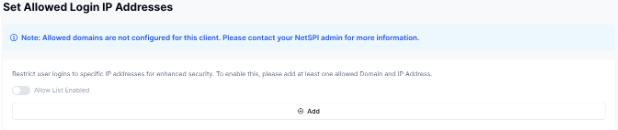
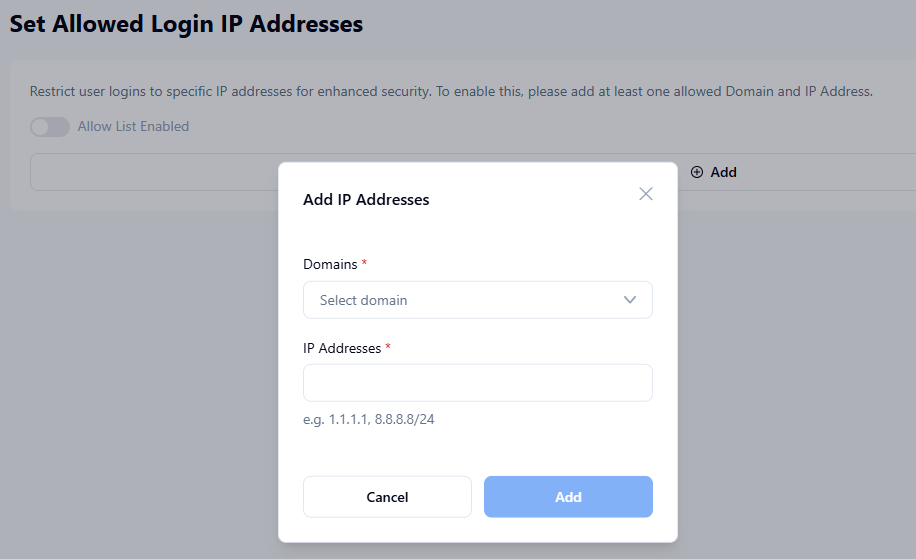
To enable this, add at least one allowed Domain and IP Address by following these steps:
- Click Add.
- Select a Domain from the drop-down list.
- Enter the IP Address.
- Click Add.
If a NetSPI Platform user from your organization attempts to log into the platform from a non-approved domain or IP address, a 403 Forbidden page displays a message indicating they need to log in from a valid IP address.
Allow List Enabled
Use the Allow List Enabled option to restrict user logins to specific IP addresses for enhanced security. To enable this, first add at least one allowed Domain and IP Address, and then move the Allow List Enabled slider to active.